How to Set Different Discounts for Subscriptions vs One-Time Purchases in Shopify

Subscription commerce is growing rapidly on Shopify, and merchants need pricing strategies that reward recurring customers without giving away too much on one-time orders. The challenge is that Shopify’s native discount system treats all purchases the same — there is no built-in way to offer 20% off for subscribers and 10% off for one-time buyers under a single discount code. PowerX Functions Creator bridges this gap with rules that detect purchase type and apply the appropriate discount automatically.
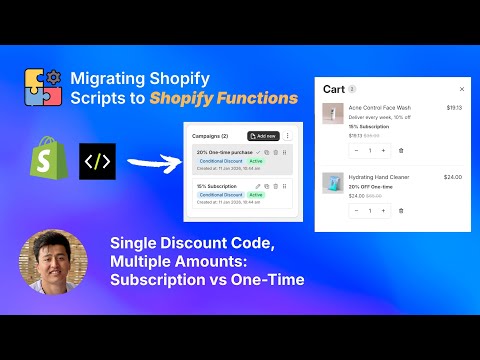
What You’ll Learn in This Video
Section titled “What You’ll Learn in This Video”- How to create discount rules that differentiate between subscription and one-time purchases
- Configuring cart qualifiers to detect selling plan types
- Setting up a single discount code with multiple tiers based on purchase type
- How this works with popular Shopify subscription apps
Step-by-Step Guide: Subscription vs One-Time Discount Rules
Section titled “Step-by-Step Guide: Subscription vs One-Time Discount Rules”Why Differentiated Pricing Makes Business Sense
Section titled “Why Differentiated Pricing Makes Business Sense”Subscription customers have a fundamentally higher lifetime value than one-time buyers. A subscriber who orders monthly for a year generates 12 transactions from a single acquisition cost. This economic reality justifies offering subscribers a larger discount — you are not losing margin, you are investing in a customer relationship that will return significantly more revenue over time.
At the same time, you do not want to over-discount one-time purchases. A customer buying a single item generates one transaction, and the discount directly reduces that order’s profitability. The optimal strategy is tiered: reward the subscription commitment with a meaningful discount while offering a smaller but still attractive discount to one-time buyers.
Common subscription discount strategies:
- 20% off subscriptions, 10% off one-time — The most popular split. Subscribers feel meaningfully rewarded while one-time buyers still get a deal.
- 25% off subscriptions, 0% off one-time — Subscription-exclusive discounts that drive conversion to recurring plans.
- Fixed $5 off subscriptions, percentage 10% off one-time — Mixing discount types based on what works best for each purchase model.
Configuring the Discount in PowerX
Section titled “Configuring the Discount in PowerX”Setting this up requires creating a product discount campaign with two rules — one for subscriptions and one for one-time purchases. Here is the process:
-
Create a new Product Discount campaign. Navigate to the PowerX dashboard, go to Product Discounts, and click “Create Campaign.” Name it something descriptive like “Subscription Tier Discount.”
-
Set up the subscription rule. Create your first rule and set the discount value to your subscription tier — for example, 20% off. Under the cart qualifiers, add a condition that detects items purchased with a selling plan (subscription). This qualifier checks whether the item in the cart has an active selling plan attached to it.
-
Set up the one-time purchase rule. Add a second rule within the same campaign. Set the discount value to your one-time tier — for example, 10% off. Add a cart qualifier that matches items without a selling plan, targeting only one-time purchases.
-
Assign a discount code or set as automatic. You can trigger this campaign with a discount code that customers enter at checkout, or configure it as an automatic discount that applies without any code. Both approaches work — the rules evaluate purchase type regardless of the trigger method.
-
Test with both purchase types. Add a subscription item to your cart and verify the 20% discount applies. Then switch to a one-time purchase of the same product and confirm the 10% discount appears instead. Test edge cases like carts containing both subscription and one-time items — each item should receive its appropriate discount.
Compatibility with Subscription Apps
Section titled “Compatibility with Subscription Apps”PowerX works with any Shopify subscription app that uses the standard selling plan API. This includes popular apps like Recharge, Bold Subscriptions, Loop Subscriptions, Seal Subscriptions, and Shopify’s own native subscriptions. The detection mechanism reads the selling plan data that these apps attach to cart items, so there is no app-specific configuration needed.
Handling Mixed Carts
Section titled “Handling Mixed Carts”When a customer’s cart contains both subscription items and one-time items, PowerX evaluates each item independently. The subscription products receive the higher discount, and the one-time products receive the lower discount. The customer sees a clear breakdown at checkout showing the different discount amounts applied to each item.
Refer to the getting started guide for initial setup and campaign configuration basics.
Key Takeaways
Section titled “Key Takeaways”- Subscription customers deserve bigger discounts because their lifetime value justifies it
- PowerX detects purchase type automatically using Shopify’s selling plan API
- A single discount code can apply different rates to subscriptions vs one-time purchases
- Mixed carts are handled correctly — each item gets the discount matching its purchase type
- Works with all major Shopify subscription apps without special configuration
Frequently Asked Questions
Section titled “Frequently Asked Questions”Can I offer a bigger discount for subscriptions than one-time purchases?
Section titled “Can I offer a bigger discount for subscriptions than one-time purchases?”Yes, PowerX lets you configure separate discount values — for example 20% for subscriptions and 10% for one-time purchases — under a single discount code. The system automatically detects whether each cart item is a subscription or one-time purchase and applies the corresponding discount.
Does this work with Shopify’s native subscription apps?
Section titled “Does this work with Shopify’s native subscription apps?”Yes, PowerX works with any Shopify subscription app that uses the standard selling plan API. This includes Recharge, Bold Subscriptions, Loop, Seal, and Shopify’s built-in subscriptions. No additional configuration is needed for specific apps.
Can I apply this to automatic discounts too?
Section titled “Can I apply this to automatic discounts too?”Yes, you can configure these rules for both discount codes and automatic discounts applied at checkout. Automatic discounts are particularly effective for subscription incentives because they apply without the customer needing to remember or enter a code.
Video Series Navigation
Section titled “Video Series Navigation”This is Part 3 of our Shopify Functions Tutorial Series.
- Previous: How to Exclude Products from Order Discounts
- Next: How to Discount the Most Expensive Product in Shopify Cart
Ready to reward your subscribers with smarter discounts?
- Install PowerX Functions Creator — free on development stores, 3-day free trial on paid plans
- Read the Product Discount documentation for the full configuration reference
- Explore Cart Qualifiers to learn about selling plan detection and other conditions
- Follow the Getting Started guide for initial setup