Shopify Script Replacement: How to Switch to Functions with PowerX

If you have been putting off your Scripts migration because it seemed complex or expensive, this video walks you through the practical, hands-on process of replacing your Shopify Scripts with Functions using PowerX Functions Creator. The app handles the technical side — you configure your logic through a visual interface, and PowerX compiles it into a high-performance Shopify Function that runs at checkout.
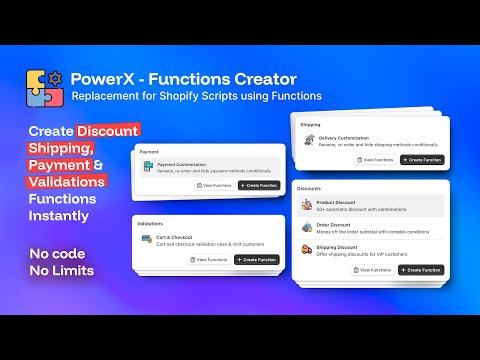
What You’ll Learn in This Video
Section titled “What You’ll Learn in This Video”- How to install and set up PowerX Functions Creator as your Script replacement tool
- Recreating common Script patterns as Functions through a visual interface
- Creating product discounts, order discounts, and more without code
- The full range of function types available beyond what Scripts offered
- Real examples of Script-to-Function replacements in action
Replacing Scripts with PowerX: The Practical Guide
Section titled “Replacing Scripts with PowerX: The Practical Guide”Why PowerX for Script Replacement
Section titled “Why PowerX for Script Replacement”When Shopify announced the Scripts deprecation, merchants faced three options: hire a developer to build custom Functions from scratch (expensive and time-consuming), find an app that provides a visual Functions builder (practical), or lose their custom checkout logic entirely (unacceptable for most stores).
PowerX Functions Creator is purpose-built for the second option. It is a Shopify Functions generator that lets you create, configure, and deploy Functions through a visual dashboard. No Rust, no JavaScript, no WebAssembly knowledge needed. You define what you want to happen at checkout, and PowerX handles the technical implementation.
The app covers every Function type Shopify supports, which means it replaces not just your Scripts but expands what you can do beyond what Scripts ever allowed.
What You Can Create with PowerX
Section titled “What You Can Create with PowerX”PowerX supports six Shopify Function types, covering and exceeding the full scope of Scripts:
Product Discounts — Apply discounts to specific products or collections based on quantity, customer tags, cart conditions, or any combination of 20+ qualifiers. This replaces Line Item Scripts that modified individual product prices.
Order Discounts — Apply discounts to the entire order subtotal. Useful for “spend $100 get 10% off” promotions, customer-tier pricing, and cart-level incentives. Also replaces Line Item Scripts that calculated order-wide discounts.
Shipping Discounts — Modify shipping rates at checkout. Free shipping thresholds, percentage-off shipping for VIP customers, and conditional rate adjustments. This replaces Shipping Scripts.
Payment Customization — Hide, rename, or reorder payment methods based on customer location, cart contents, customer tags, or order value. This replaces Payment Scripts with additional capabilities like renaming and reordering.
Delivery Customization — Hide, rename, or reorder delivery options at checkout. This has no Script equivalent — it is entirely new functionality that was previously impossible without checkout.liquid modifications on Plus.
Cart Validation — Block checkout entirely when specific conditions are met. Enforce minimum order quantities, prevent certain product combinations, restrict checkout based on customer attributes, or require specific cart conditions before allowing purchase. Also a new capability with no Script equivalent.
Hands-On Replacement Process
Section titled “Hands-On Replacement Process”Here is how to replace your Scripts using PowerX, start to finish:
-
Install PowerX from the Shopify App Store. The app is free on development stores, and live stores get a 3-day free trial on the Professional plan. Follow the getting started guide to connect the app to your store.
-
Identify your first Script to replace. Start with the simplest one. If you have a Line Item Script that gives 15% off products tagged “sale,” that is a straightforward first migration.
-
Create the equivalent Function. Go to Product Discounts, create a new campaign, add an item selector targeting the “sale” tag, set the discount to 15%, and choose whether it applies automatically or via a discount code.
-
Add any conditions your Script had. If the Script only fired for logged-in customers, add a customer qualifier. If it required a minimum cart value, add a cart qualifier. PowerX’s condition system maps directly to common Script logic patterns.
-
Activate and test side by side. Enable the Function while your Script is still active. Test checkout with various product combinations and customer accounts. Verify the discount amounts match. Once confirmed, disable the Script.
-
Repeat for each remaining Script. Work through your Scripts one at a time. Payment Scripts become Payment Customization campaigns. Shipping Scripts become Shipping Discount campaigns. Complex Line Item Scripts may become multiple Product or Order Discount campaigns.
Going Beyond Scripts
Section titled “Going Beyond Scripts”Once your migration is complete, you will likely discover that Functions open up possibilities your Scripts never could:
- Cart validation lets you enforce business rules before checkout — minimum order values, restricted product combinations, or age-verification requirements.
- Delivery customization lets you control which shipping options appear based on cart contents, customer location, or customer tags — previously impossible without Plus checkout.liquid access.
- Multi-condition campaigns combine product targeting, customer segmentation, and cart conditions in ways that would have required extremely complex Script code.
- Cross-plan availability means stores on Basic or Advanced Shopify can now access the same checkout customization that was previously locked behind the $2,300/month Plus price tag.
Browse the examples library for dozens of ready-made configurations covering common use cases across all six function types.
Key Takeaways
Section titled “Key Takeaways”- PowerX Functions Creator is a visual Script replacement tool — no coding required
- Six function types cover everything Scripts did, plus delivery customization and cart validation
- The migration process is straightforward: identify Script logic, recreate as a Function campaign, test, then disable the Script
- Free on development stores with a 3-day free trial on the Professional plan for live stores
- Functions work on all Shopify plans, removing the Plus-only restriction that Scripts had
Frequently Asked Questions
Section titled “Frequently Asked Questions”Is PowerX Functions Creator free to use?
Section titled “Is PowerX Functions Creator free to use?”PowerX offers a free plan for development stores and a 3-day free trial on the Professional plan for live stores. This lets you fully test the migration before committing. After the trial, plans start at $27.30/month for the Professional tier, which includes 10 campaigns with 10 rules each.
What types of functions can I create with PowerX?
Section titled “What types of functions can I create with PowerX?”You can create product discounts, order discounts, shipping discounts, delivery customization, payment customization, and cart validation functions. These six types cover everything Shopify Scripts could do and add two entirely new capabilities — delivery customization and cart validation — that were not available with Scripts.
How long does it take to replace a Script with a Function?
Section titled “How long does it take to replace a Script with a Function?”Most Script replacements take just a few minutes using PowerX’s visual interface — no coding required. Simple Scripts like “15% off tagged products” take under two minutes. More complex Scripts with multiple conditions and tiers may take 10-15 minutes as you set up the corresponding rules and qualifiers.
Video Series Navigation
Section titled “Video Series Navigation”This is Part 14 of our Shopify Functions Tutorial Series — the final episode.
Ready to replace your Shopify Scripts with Functions?
- Install PowerX Functions Creator — free on development stores, 3-day free trial on paid plans
- Follow the Getting Started guide for initial setup
- Explore Product Discounts and Order Discounts to recreate your Script logic
- Browse real-world examples for common configurations across all function types